tech 2026-08-28
My Self Hosted Apps

Intro
Maybe it was around the early 2000s as a kid, where I remember storing my passwords in plain text files on my windows desktop using notepad. Along with passwords, I also stored notes on the games I played. Namely FFXI, Silkroad Online, and Runescape. I would save notes on where rare monsters spawned, good farming spots, crafting recipes, and all sorts of other things I thought were worth saving.
Flash forward to today, where we have Notion and Obsidian (paid version) for note taking. These are live services with payment options and data gathering functions. And before any Obsidian users start raising their pitchforks, I know that Obsidian is mostly local storage. While any of your notes are encrypted before sent to their servers, you still need to give up your email, identity, payment info, etc, before you can use their note syncing service. This to me is what I would consider "data gathering", because you cannot trust anyone other than yourself when it comes to your privacy.
If you've ever thought about wanting to step away from these services like google, notion, figma, github, jira, and many others, then I would recommend reading the rest of this post. I have not opened google drive and notion in months at this point, and have recently even replaced figma.
The main reason why I have completely moved off these platforms is because I want complete control of my own data. Who knows what these companies are doing with the data you give them. And it's not like I have anything to hide, but there is a reason why we use curtains and blinds in our homes right?
Self Hosting Requirements
What could be better than Obsidian, you might ask. Well, let me introduce you to the world of self hosting. Let's start with the service that's been a hot topic lately, Github. Recently, Github's uptime has been pretty horrendous. Not only that, but there are a lot of paid features like uncapping github runner time limits, fine grain branch protection on team repositories, custom roles, etc. What I use instead of Github is Gitea, and it has most of Github's paid features for free.
To start the self hosting yourself, you first need a server. You can rent one from any service like digitalocean, linode, aws, or azure. There are probably plenty of other options, and I can't really recommend one (unless one wants to sponsor me). Definitely do your research before paying for one though. Typically a $5/month is more than enough, Gitea only needs something like 500mb of ram, 100mb of storage space for the base, and at minimum a 1 core CPU to run the app.
The other option is to create a home server, which is what I do and is my preference. If you have a crappy old office computer laying around (assuming it has reasonable specs like more than 2GB of ram), or $50-$100 to spare, you are ready to set one up. The process for setting the network up properly needs it's own guide, which maybe I can write up later. But the bottom line is that you have access to a server that is connected to the internet, and you can SSH into it.

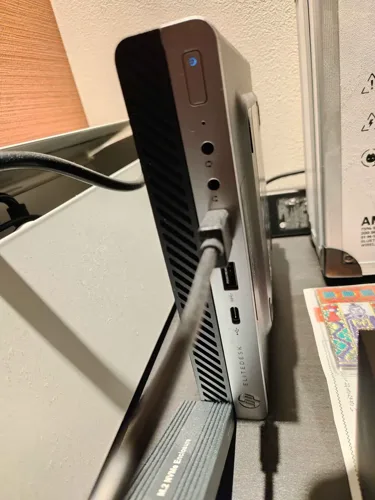
My home server is a small HP Elitedesk 705 G4, I bought it awhile ago for around $100 in used condition. I feel like I should have bought something more future proof, but I think it's money well spent for the use I've gotten out of it so far.
Self Hosting with Docker
I like containerizing all my self hosted apps because I can just run a simple command of docker compose pull && docker compose up -d to update my Gitea to the latest version. Otherwise, it's a process of downloading and installing the binary, and refreshing the system service in order to reflect changes. Which is kind of a hassle in my opinion.
Let's keep rolling with Gitea as our example, here is the documentation for deploying with docker: https://docs.gitea.com/installation/install-with-docker/. As you can see in the docs, it's pretty simple to configure if you just follow along the page's index. Some self hosted apps might read from a .env file, and maybe some might have a mixture of both.
All self hosted apps will have similar documentation if you search for deploying it with Docker. If you can't find a self hosted app with their own Docker setup, then I think it's not too hard to set one up yourself. Especially in today's age of AI/LLMs.
Below is an image of all my docker hosted services on my home server, and the only non-docker service is Gitea actually. I plan to migrate Gitea over to docker, whenever I have free time in the future. But as you have seen, my home server has pretty humble specs I would say, and it is able to handle hosting several apps across a mixture of domains and tailscale ports without breaking a sweat.


Security
I use Tailscale to secure my self hosted apps (image on the very top). This means that only devices I give access to through my tailscale account can access these apps. Some people might not know what Tailscale is, but it is a private vpn (built on Wireguard), so this means that the tailscale service needs to be running on your device in order for you to be able to go to the urls that are hosted on the vpn's network. While tailscale is technically a 3rd party service, I find their UI and features to be very convenient. I'd rather use tailscale than self host wireguard myself for now.

The image above is a very simplified version on how it works, but essentially you can set your home server to host Gitea, and then put the home server under your tailscale network. After this, you can then add any other device onto your tailscale network, and access Gitea through only those devices. Any devices (whether owned by you or others) not under this network, like "Desktop 2", cannot access Gitea nor your tailscale network. Each device under your tailscale network will be assigned a tailscale IP, as indicated with the "100.x.x.x" labels in the image. Tailscale also offers "magicDNS": https://tailscale.com/docs/features/magicdns. Which allows you to attach a url name to a device (DNS), instead of having the "100.x.x.x" IP.
This means that if Gitea is hosted on port 3000 on "Home Server" as seen in the image above, any device on the same network can go to https://flying.dog.ts.net:3000 to access that server's Gitea instance. Now you can see the reason why I made a launch pad, since memorizing several port numbers is something I can't do. The other option would be to configure nginx and tailscale to host specific domain names to each app, but that is kind of a pain in my opinion. It's just easier in my view to re-route a localhost port to the ssl port.
Tailscale does not come with HTTPS out of the box, you will need to set it up here: https://tailscale.com/docs/how-to/set-up-https-certificates. Some self hosted apps actually need HTTPS for some browser functionalities to work, so I would recommend setting it up right away.
The Apps I Use
If all you wanted to read is what apps I use, then here is a simple list:
Affine : Notion Alternative
Vikunja : Kanban Board/Task Manager
FileBrowser Quantum : Dropbox/Drive Alternative
Cryptpad : Drive Alternative
Drawnix : Excalidraw Alternative
Gitea : Github Alternative
Penpot : Figma Alternative
I think I could get rid of filebrowser quantum, as cryptpad kinda serves as a file storage as well. But it's kind of nice to just have a dedicated shared folder area. The most impressive self hosted app in my opinion is Penpot though, I think it takes a lot of effort to make a design tool that is easy to use.
I hope that this post helps people get curious on self hosting. Not only is it more economical, but you also stop companies from exploiting you by not using their platform. It's very easy to audit self hosted apps, since they are open source and you also have access to the network that it's hosted on. You can check network traffic on your server to see if any traffic is leaving from your self hosted app's docker container to an unknown device, and I am sure that the issues tab would have someone making a deal out of it if they were actually doing anything malicious.